Milanote is a versatile tool that goes beyond its primary function as a mood-boarding app. It allows interior designers and other users to gather images from various sources on the web. It facilitates communication both within and outside of a business setting or create complete SOP of their processes. This introduction highlights its frequent use in professional environments, showcasing its adaptability and broad range of applications.
Want to get 3D rendering for your interior design project?

George is a seasoned interior designer and property marketing strategist with over 13 years of experience. He specializes in transforming properties into visually stunning spaces, helping clients recognize the potential and beauty in each property. With an impressive international client base of exciting projects throughout Europe and America.
Using Milanote for Interior Design
Milanote is a versatile tool that is particularly useful for interior designers. It allows for the creation of mood boards, which are essential in the initial stages of a project. These mood boards help in effectively communicating ideas and concepts to clients.
Beyond client communication, Milanote is also beneficial for organizing personal vision boards and managing business content. Users can set up various pages to categorize different aspects of their work, such as courses, business projects, and personal vision boards.
The platform’s home page serves as a central hub where users can create and manage dummy pages for different purposes. For instance, one might set up pages for courses, interior design practices, and vision boards. Additionally, Milanote supports the management of multiple small projects simultaneously.

Milanote Features and Pricing
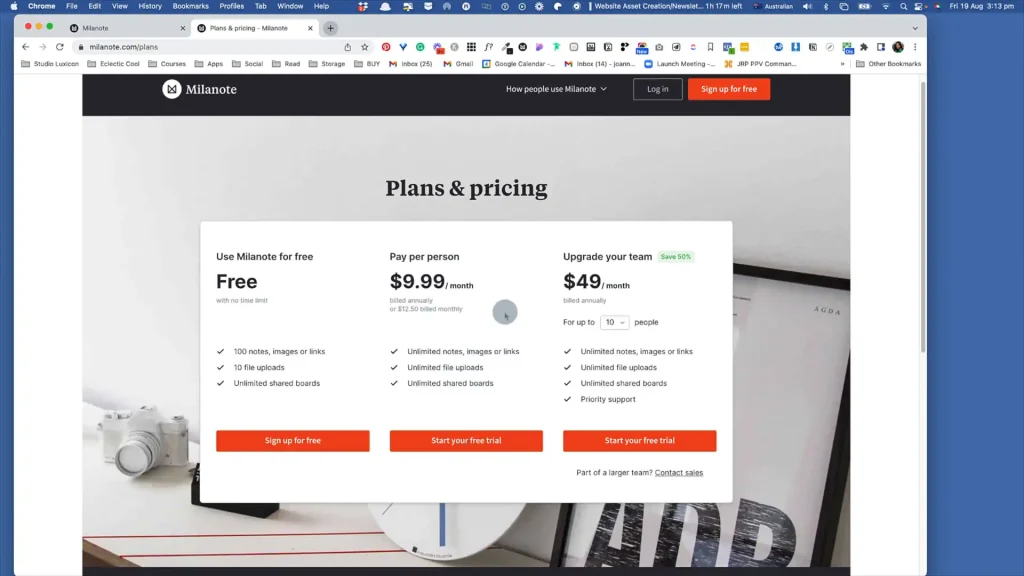
Milanote offers a flexible pricing structure that caters to different user needs. For those who use up to a hundred notes, images, or links, Milanote is free. This free plan also allows users to upload up to ten files and share an unlimited number of boards. Users can manage their space by deleting boards after completing their projects, making it feasible to use Milanote without any cost if they are willing to manage their content efficiently.
For users who require more extensive features, Milanote offers a paid plan. At ten dollars a month, billed annually, users can enjoy unlimited notes, images, links, and file uploads. This plan is ideal for those who need more storage and flexibility in their creative projects.
Creating and Customizing Boards in Milanote
Creating and customizing boards in Milanote is a straightforward process that enhances your ability to organize and visualize your projects effectively. Here’s how you can get started:
Steps to Create a New Board
To create a new board in Milanote, simply drag and drop elements to start building your board. This intuitive process allows you to quickly set up a workspace tailored to your needs.
Customizing Board Colors and Icons
Milanote offers customization options that let you personalize your boards. You can change the color scheme to match your brand colors and add icons to make your boards visually appealing and organized.
Using Templates for Recurring Processes
For tasks that you perform regularly, consider using templates. This feature allows you to streamline your workflow by reusing board structures that suit your recurring needs.
Organizing Interior Design Projects
Organizing interior design projects can be streamlined using Milanote by creating specific boards for each room. This approach allows designers to manage and visualize different aspects of a project efficiently.
Creating Boards for Different Rooms
One effective method is to create a separate board for each room in a project. For instance, you might have boards for the kitchen, bathroom, bedroom, study, entry, living room, and dining room. This segmentation helps in focusing on the unique requirements and design elements of each space.
Examples of Room-Specific Boards
- Kitchen: A board dedicated to kitchen design can include layout plans, appliance selections, and color schemes.
- Bathroom: This board might focus on fixtures, tiling options, and lighting.
- Bedroom: Here, you can explore furniture arrangements, bedding choices, and decor styles.
- Study: A study board could include desk designs, shelving options, and ergonomic considerations.
- Entry: This board might cover entryway furniture, lighting, and storage solutions.
- Living Room: Focus on seating arrangements, entertainment setups, and color palettes.
- Dining Room: Consider dining table styles, chair selections, and lighting.
Using Templates for Efficient Project Setup
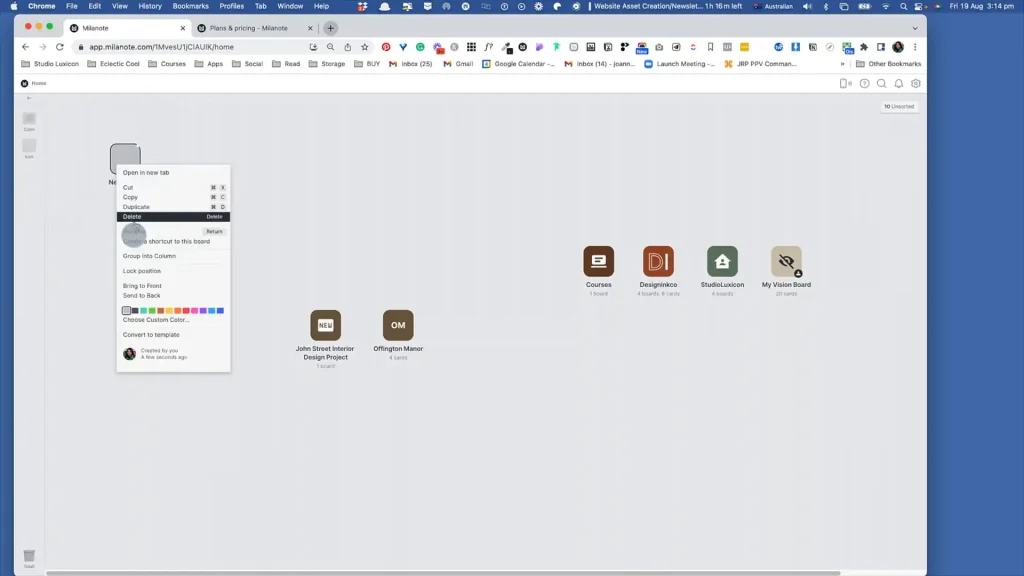
Milanote allows you to convert boards into templates, which can be reused for future projects. This feature is particularly useful for processes or layouts that are frequently used, such as mood boards. Customizing the appearance of these boards, including icons and colors, can further enhance organization and visual appeal.
By utilizing these strategies, interior designers can maintain a well-organized and efficient workflow, ensuring that each project is managed with precision and creativity.
Advanced Features of Milanote
Milanote offers a range of advanced features that enhance the organization and creativity of interior design projects. One of the standout capabilities is the ability to convert boards into templates. This feature allows users to set up a template once and reuse it for future projects, saving time and ensuring consistency. Instead of setting up new boards from scratch, you can make adjustments to the template to fit the specific needs of each project.
For instance, when working on a kitchen design, you can choose from various templates and create a mood board. Milanote auto-populates some images, and you have the option to keep the example content or start with a blank template. This flexibility allows you to upload images and organize them according to categories like color, material, and appliances.
The platform also provides tools for customizing content. You can select colors using a slider or pick specific shades for elements like cabinets. Unnecessary items can be easily deleted, streamlining the design process. Uploading images is straightforward, and you can save them directly to your board. This feature is particularly useful for visualizing design elements such as white glossy cabinets.
Overall, Milanote’s advanced features facilitate a seamless workflow for interior designers, allowing them to focus on creativity and client satisfaction.
Integrating Milanote with Other Tools
Integrating Milanote with other tools can significantly enhance your workflow and collaboration capabilities. Here’s how you can make the most of these integrations:
Exporting and Sharing Boards
Milanote allows you to export your boards in various formats. You can convert them into PDFs or linear documents, making it easy to share with others. Additionally, you can invite editors to collaborate directly on the board. For a more controlled sharing option, you can create a read-only link, allowing others to view and comment without altering the content.
Integrating with Notion
Milanote’s flexibility extends to integrating with tools like Notion to power the SOP of your design firm. You can copy links from Milanote and incorporate them into your Notion account, creating a seamless connection between your planning and documentation tools.
Creating Links and References
Creating links and references within Milanote is straightforward. You can copy links to specific items and share them via email or other communication tools. This feature is particularly useful for maintaining organized and accessible project references.
Conclusion and Recommendations
In conclusion, Milanote offers a versatile and user-friendly platform for organizing and managing interior design projects. Its unlimited canvas allows for creative freedom, enabling users to create and customize boards to fit their specific needs. The ability to embed links and create full-width pages enhances the ease of reference and organization.
One of the key considerations when using Milanote is its adaptability in terms of resizing and organizing content, especially when preparing to print as a PDF. Users can manage the size of images and text to ensure everything fits neatly on separate boards.
For those interested in exploring Milanote further, a free trial is highly recommended. This allows potential users to experience its features firsthand and determine how it can best serve their project needs.
Want to get 3D rendering for your interior design project?